FEATURES

Easy DMARC Policy Management

Set and manage your DMARC policies easily via our intuitive, modern interface. Track policy changes that impact how your domain is protected.

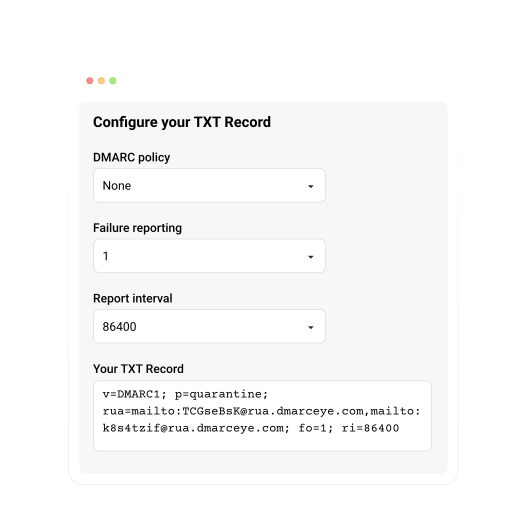
Guided Configuration

DMARCeye guides you through your DMARC policy setup step-by-step. We will generate the correct TXT record in accordance with the policy you select, so that you can configure quickly, securely and without complex technical intervention.

DMARC-config
features-policy update

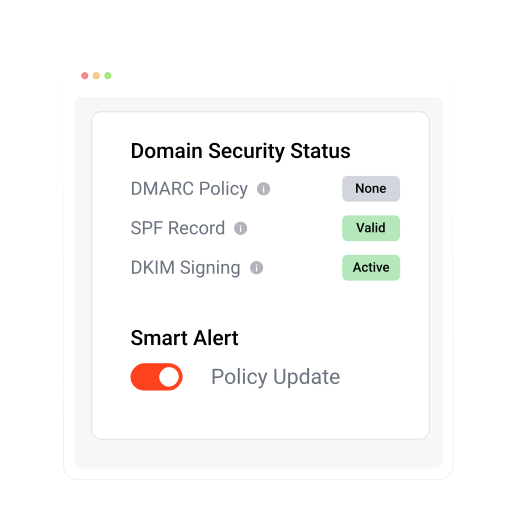
Automatically Track Changes

Any policy change has a direct impact on how your emails are protected. DMARCeye therefore monitors your policies and will notify you immediately in case of any changes to them.

Changes should never be made without your knowledge.

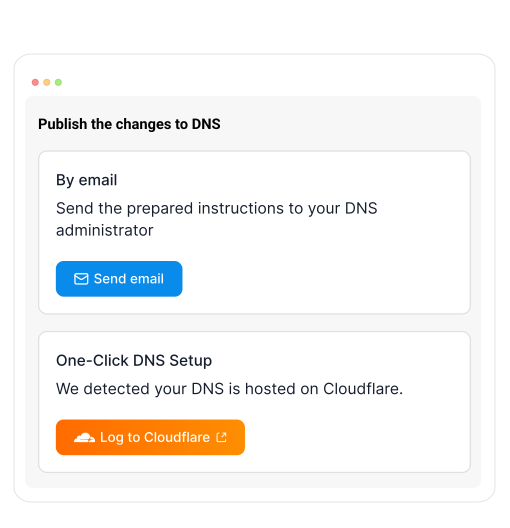
One-click DNS Setup

Manage your DNS setup directly from our app in just a few clicks. Add your domain, review the required records, and keep everything up to date without logging into multiple tools.

We currently support Cloudflare, and we’re actively adding more DNS providers so you can handle all your DMARC, SPF, and DKIM changes from one simple, secure interface.

DMARC-one-click2

The questions DMARCeye answers

Most DMARC tools show you data. DMARCeye answers questions. Here are the four we hear most often, and the features that answer them.

Is anyone pretending to be us?

Your reports list every source sending as your domain, with its authentication result next to it. An impersonator stands out: an unfamiliar service, failing DMARC, often from a location where you have no presence, plotted on the sender geolocation map.

Why are our newsletters going to spam?

Open the daily chart and find the day deliverability changed. Then drill into the service that sends your campaigns: the SPF and DKIM breakdown shows whether the platform broke something or your DNS settings drifted.

We're switching email tools - did the setup work?

Your new service shows up in the reports as soon as it starts sending, with its pass rate beside it. A clean setup sits near 100% from day one. A broken one shows exactly which check fails, before your customers notice anything.

Can we safely turn on stricter protection?

Check the pass rate of every service you use. When they all pass, tightening the policy is safe, and DMARC Management generates the stricter record for you, with one-click publishing if your DNS runs on Cloudflare.

Bart, the AI chat built into the app, answers these questions and any others: ask in plain language and he replies straight from your own reports.

PLATFORM FEATURES

Everything you need to keep your domain safe

DMARCeye is a comprehensive tool for DMARC report monitoring and policy management, helping you protect your domain and increase email deliverability.

icon-50x50-05

DMARC Reporting

Get instant visibility into your email authentication status with comprehensive dashboards.

LEARN MORE
alert-icon

Smart Alerts

Receive notifications only when they truly matter. DMARCeye filters out the noise and highlights what needs your attention.

LEARN MORE
icon-50x50-10

DMARC Management

Easily manage your DMARC policies with our interface and without complex commands or deep technical knowledge.

LEARN MORE
monitoring.icon

Always-On AI Assistant

No more guessing what "quarantine" means. Just ask, and get an answer — or let AI Assistant flag the problem.

LEARN MORE
icon-50x50-08

Infrastructure overview

Gain a detailed overview of your entire email infrastructure. See exactly who is sending email on behalf of your domains.

LEARN MORE
icon-50x50-03

Agency Account

Multi-tenant, white-labeled platform with AI portfolio management and centralized billing for agencies and resellers.

LEARN MORE