This article explains DMARCeye MCP Server, what you can do with LLMs using your DMARC data, and how to enable MCP for DMARCeye in minutes.
DMARC is supposed to make domain protection and enforcement straightforward. But in reality, most teams spend more time interpreting reports than actually improving their policy posture.
That’s why we’re introducing DMARCeye MCP (Model Context Protocol): a new way to bring your DMARCeye data into LLMs (like ChatGPT), so you can ask questions in plain language and get answers grounded in what your domain is actually doing.
What's in This Guide
- What Is DMARCeye MCP?
- Why DMARCeye MCP Is a Game-Changer
- What You Can Do by Connecting Your DMARCeye Data to LLMs
- How to Enable MCP Server for DMARCeye (No Dev Necessary)
- Why Use DMARCeye to Monitor and Help You Act on DMARC Reports?
What Is DMARCeye MCP?
DMARCeye MCP lets you connect your DMARCeye account to ChatGPT and other LLMs, so that you can use natural-language prompts to explore and understand your DMARC data.
Instead of jumping between XML-derived dashboards, exports, and troubleshooting notes, you can ask direct questions like:
- What changed in my DMARC posture over the last 7 days?
- Which sources are failing alignment, and what’s the most likely cause?
- What should I fix first before I move from p=none to enforcement?
- Write a staged rollout plan using pct based on my current failure patterns.
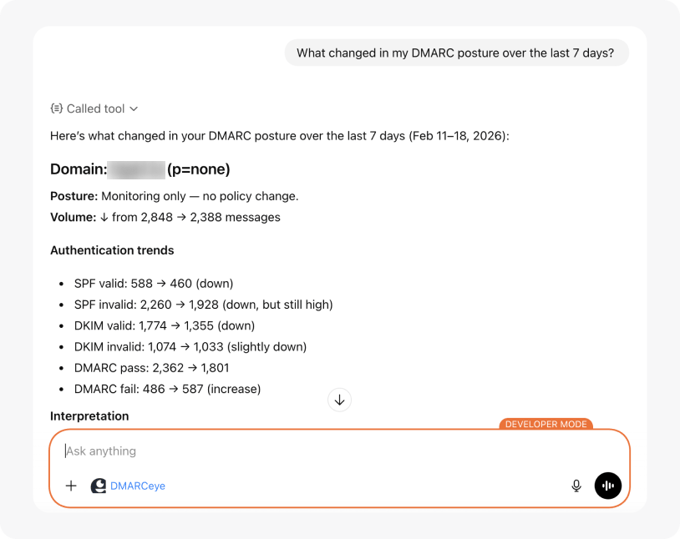
The goal is simple: turn DMARC reporting into actionable next steps with guidance that's personalized and domain-specific.
Why DMARCeye MCP Is a Game-Changer
Mailbox providers deliver DMARC aggregate reports as XML. Those reports contain valuable signals, like who is sending on your behalf, whether SPF and DKIM are aligned, which streams are failing, and how much volume is involved.
But XML was never designed to help humans decide what to do next. Even with a DMARC report monitoring platform that parses the data and shows what's happening, many teams still don't know what to do next, or what's safe to change without breaking legitimate email. Here's the data that proves it:
In a snapshot of thousands of domains that DMARCeye has been monitoring since February of 2024:
- 43.7% of domains with DMARC remain at p=none (monitor-only).
- Only 19.3% have reached p=reject (full enforcement).
- Even among enforcing domains, just 6.0% use staged rollout (with pct below 100).
In other words, most teams either stay in monitoring indefinitely, or they enforce in an “all or nothing” way, jumping straight to 100% enforcement without using DMARC’s built-in enforcement percentage mechanism.
This “all or nothing” approach increases the risk of disrupting legitimate email during policy changes. And the fact that it’s so common highlights the need for clearer, more personalized instruction when transitioning from monitoring to enforcement. DMARCeye MCP enables exactly this.
What You Can Do by Connecting Your DMARCeye Data to LLMs
Connecting DMARCeye to ChatGPT, Claude, Gemini, or any other LLM will change your workflow from “analyze reports” to “ask and act.” Instead of manually digging through sources and authentication outcomes, you can describe what you want to understand, and then iterate until you have a plan you trust.
With MCP enabled, you can use ChatGPT to:
- Summarize your sending landscape (what sources exist, what volume they send, and how they authenticate)
- Spot risk quickly (new or unknown sources, sudden changes, alignment failure patterns)
- Prioritize fixes (what to tackle first to reduce failure rates before policy changes)
- Plan safer enforcement (including staged rollout using pct, based on your real traffic and failure profile)
- Explain issues to stakeholders (IT, security, marketing, agencies)
- Send emails that summarize current DMARC findings, include relevant report data, and clearly recommend next steps
DMARCeye MCP works with Claude, ChatGPT, and any other MCP-compatible AI assistant, so you can use the one you prefer.
For more information about practical use cases of DMARCeye MCP, see our other article: Use Cases: What You Can Do by Connecting DMARCeye to AI Chat
How to Enable MCP Server for DMARCeye (No Dev Necessary)
MCP integration is easy to set up for DMARCeye. It only takes a few minutes and you don't need to be a developer to do it.
DMARCeye hosts the MCP Server for your account, and you simply connect it to your AI assistant of choice. We’ll be expanding support for various LLMs over time, but the setup flow is the same: add the DMARCeye MCP Server, authorize access, then start asking questions.
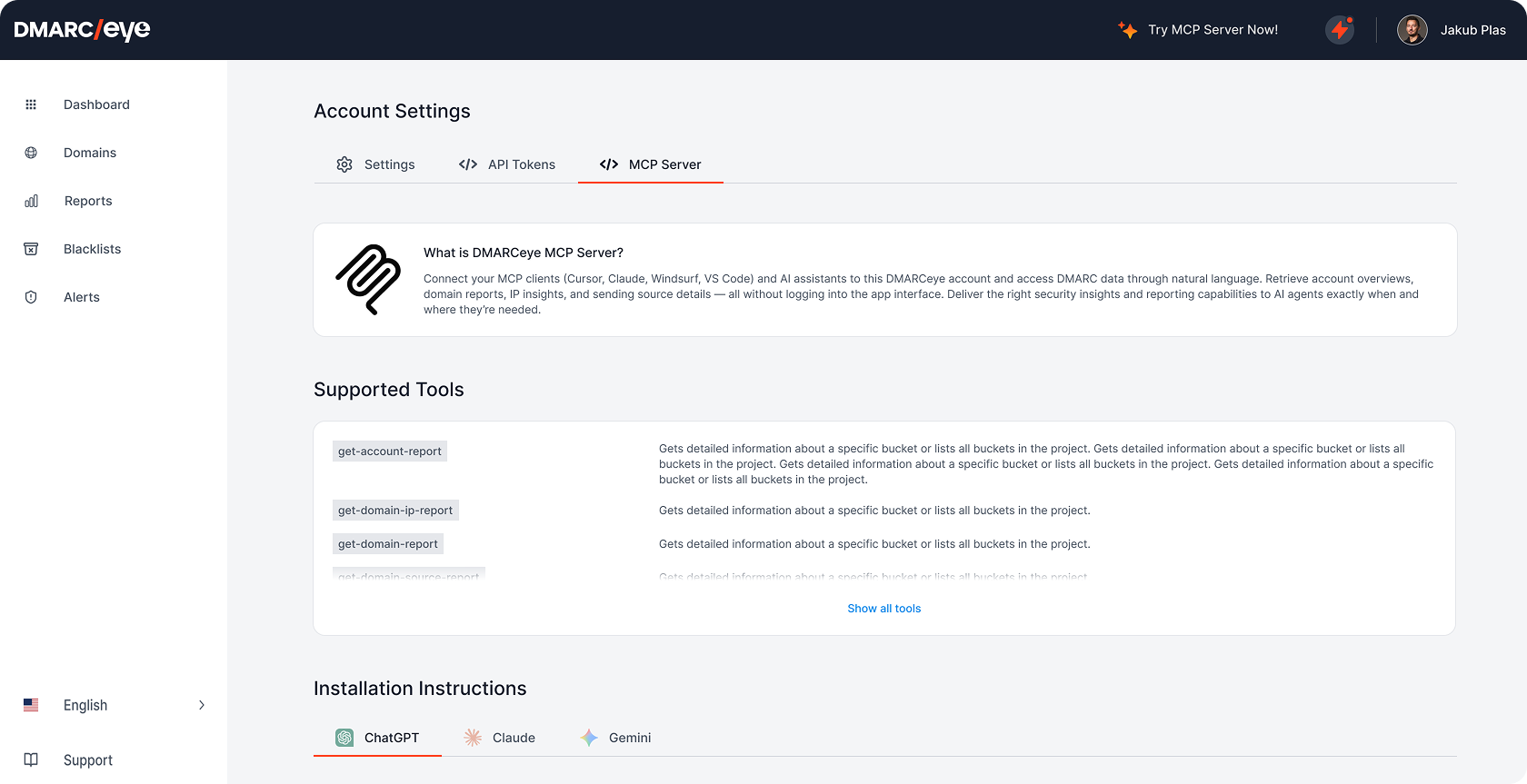
- Open the MCP Server page in the DMARCeye app (Account Settings → MCP Server) to find the connection details and supported tools.
- Add DMARCeye as an MCP server in your AI assistant (for example, in ChatGPT you create a new app/integration and paste the MCP Server URL).
- Authorize the connection so the assistant can access your DMARCeye data securely.
- Start using it in chat to retrieve reports, summarize findings, and turn DMARC data into clear next steps.
We intentionally keep the step-by-step instructions inside DMARCeye, so they stay current as assistants evolve.
Why Use DMARCeye to Monitor and Help You Act on DMARC Reports?
MCP is a major step forward in our broader promise: personalized DMARC guidance that lowers the barrier to DMARC management. But it’s only one part of what DMARCeye does.
- Continuous visibility into who sends on your behalf (including newly appearing or unknown sources).
- Smart alerts to surface changes that matter (new sources, spikes in failures, unexpected volume shifts).
- DMARC policy management to help you move from monitoring to enforcement with fewer surprises.
- Email infrastructure overview so you can understand sending systems and ownership at a glance.
- Built-in DNS tools for SPF, DKIM, and BIMI troubleshooting in one place.
Sign up for a free trial of DMARCeye today and start turning DMARC reports into clear, safer next steps.