Product Updates
Bart is the AI chat built into DMARCeye. Ask about your DMARC reports in plain language and get answers from your own data. Here is what he can do.
Bart is the AI chat built into DMARCeye. You ask a question about your DMARC data in plain language, and he answers from your own reports: the real figures, what they mean, and what to do next. Bart is included on paid plans and the 14-day free trial.
Watch Bart in action:
What's in This Guide
- What Is Bart?
- The Mini Chat: Ask About the Screen You're On
- The Full AI Chat: Where Your Conversations Live
- How Does Bart Help You Investigate a Failing Sender?
- Can Bart Explain Your Whole Domain Portfolio?
- How Do You Keep and Share Bart's Answers?
- Where Does Bart Fit Among DMARCeye's AI Features?
- Which Plans Include Bart?
What Is Bart?
Bart is a chat assistant that lives inside the DMARCeye app. Instead of working through raw DMARC reports yourself, you ask him a question, he loads the relevant report, and he answers with the numbers from your account. A general question gets a general answer. A question about a specific domain, sender, or IP address gets an answer built from your own data.

You can talk to him in two places: a mini chat that opens on every screen, and a full AI Chat view where every conversation lives.
The Mini Chat: Ask About the Screen You're On
The mini chat opens from the robot icon in the bottom-right corner of any page, and it knows which page you have open. It is built for questions that come up while you work. If a report is on your screen, you ask about it directly, without copying data in or explaining the context first. A toggle lets you set the scope yourself: Related this page keeps Bart focused on the report in front of you, and General opens the conversation to anything else DMARC-related.
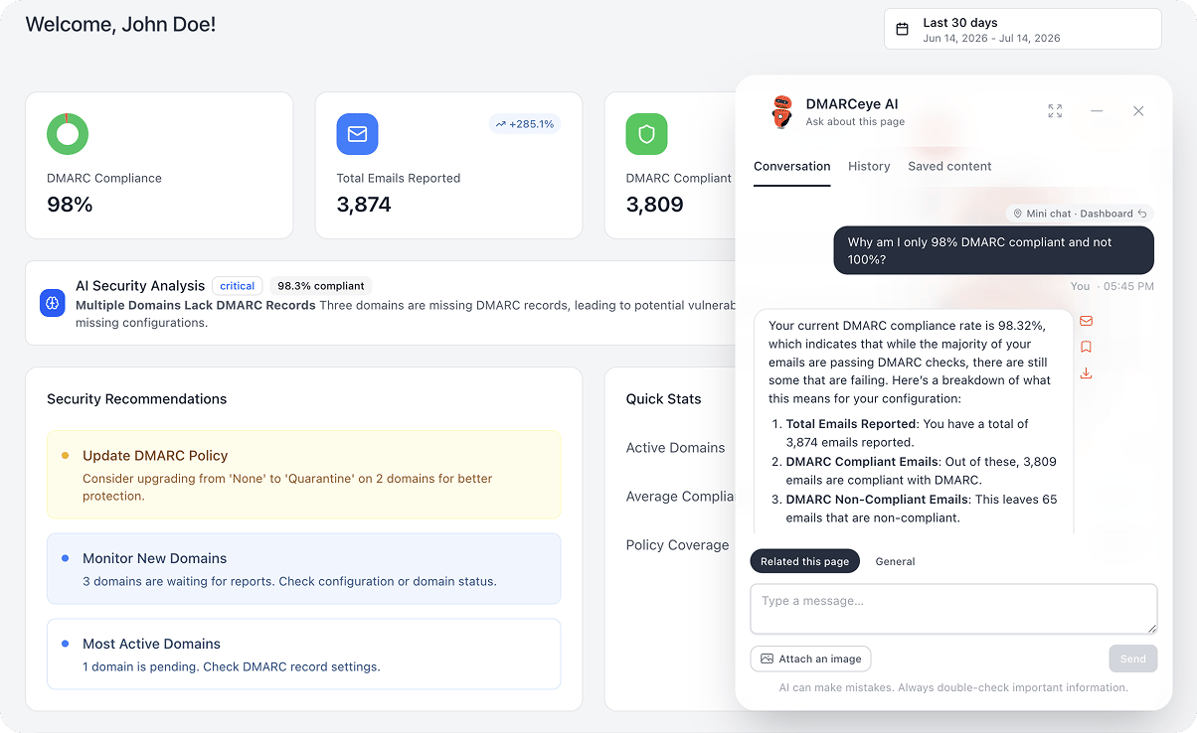
Each page-specific conversation keeps a breadcrumb tag at the top that links back to the report you asked from. When you reopen a chat a week later, one click takes you to the data it was about. And when you want more room, the mini chat expands to full screen.
The Full AI Chat: Where Your Conversations Live
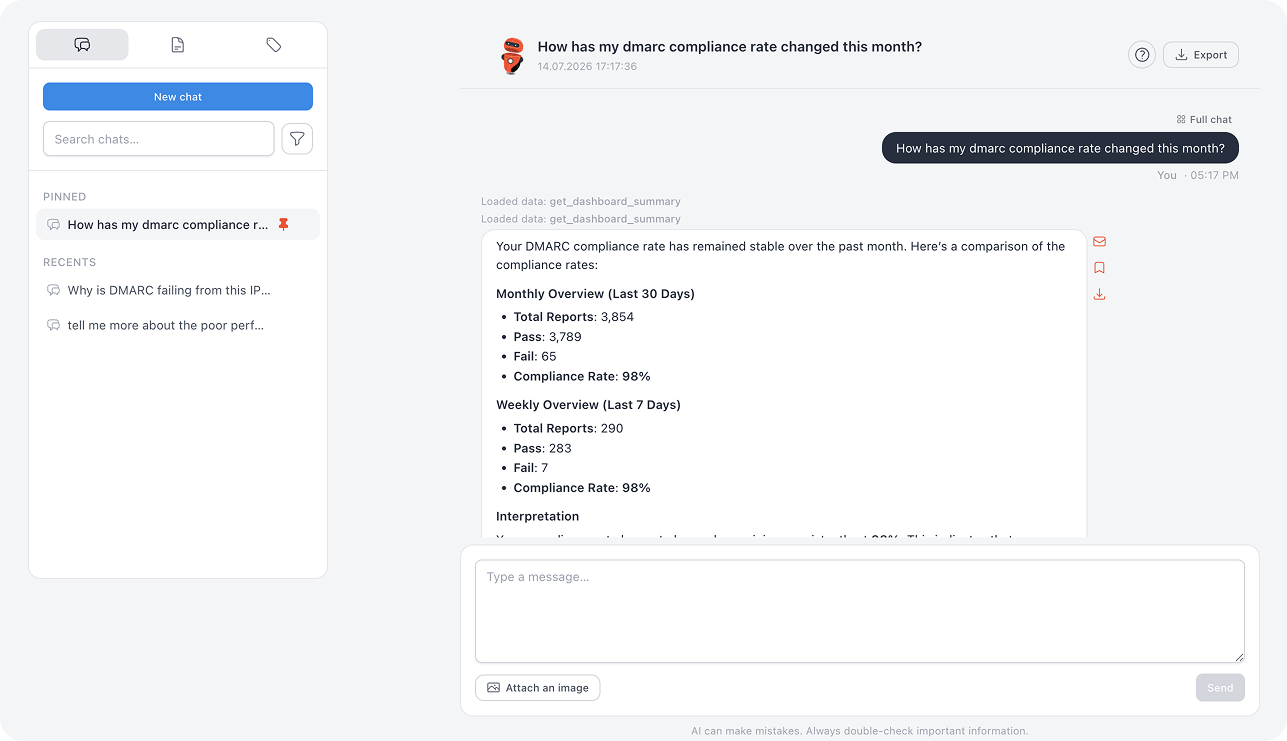
The full AI Chat opens from the left sidebar and holds every conversation you have had. The sidebar shows pinned favorites, recent threads, and full-text search, and your Saved content and tags sit one tab away. It is the view for revisiting an investigation from last month, or starting a longer session from the example prompts when you are not sure what to ask first. You can pin or rename the threads you keep returning to, and delete the ones you are done with.
How Does Bart Help You Investigate a Failing Sender?
A drop in a sender's pass rate is the moment most people wish they had a DMARC specialist on call. With Bart, you open the sender's report and ask what is going on. He pulls the underlying data and answers with the numbers: how many messages the source sent, how many passed authentication, and what the failure pattern looks like. After the numbers, he adds key insights and recommendations, so the answer ends with something you can do rather than something you still have to interpret.
Every data-grounded answer is labeled with the report it loaded, so you know where the numbers came from. If you want to work through the same report by hand, the guide to reading DMARC aggregate reports covers what each field means.
Can Bart Explain Your Whole Domain Portfolio?
Yes. Ask for an overview and Bart lists every domain your team monitors, with its current DMARC policy and the record it publishes. One question replaces a walk through every domain view, which matters once you manage more than a handful of domains.
The answer works as a starting point, too. Spot a domain with no record or a policy weaker than you expected, and you can drill into it in the same conversation.
How Do You Keep and Share Bart's Answers?
Bart helps you keep your chats organized and shareable.
- Save an answer to your Saved content library, with an editable title. The library has its own tags, filters, and full-text search, and Bart can suggest the tags himself based on what the chat covers, so a good explanation is findable months later.
- Email an answer to a team member directly from the chat. If you run domains for clients, the finding goes straight to the colleague who owns the account, in plain language that they can forward.
- Export a whole conversation as PDF, HTML, or JSON when you need it in a report, an audit trail, or another tool.
Bart also reads images. Attach a screenshot to your question in either chat, and he answers about what it shows.
Where Does Bart Fit Among DMARCeye's AI Features?
Bart is one of three AI features in DMARCeye, and each covers a different moment.
- AI Security Analysis runs without being asked. It reads your whole account and puts a plain-language summary and prioritized recommendations on your dashboard.
- Bart, the in-app AI chat, is the interactive one. You ask, and he answers from your reports.
- The MCP server connects AI tools you already use, such as ChatGPT or Claude, to your DMARCeye data.
The difference between the last two comes down to where you work. Bart is built in and needs no setup. The MCP server brings the same data into assistants outside the app.
Which Plans Include Bart?
Bart is included on paid plans. The 14-day trial comes with 10 free messages, so you can try him on your own reports first. AI Security Analysis is included on every plan, including Free. The pricing page has the full comparison.
DMARC data is useful in proportion to how easy it is to act on. Bart shortens the distance between a question and a decision: the report loads itself, and the answer ends with a next step. DMARCeye pairs him with analysis that runs on its own, so the answer is there whether you ask or not.